Computer
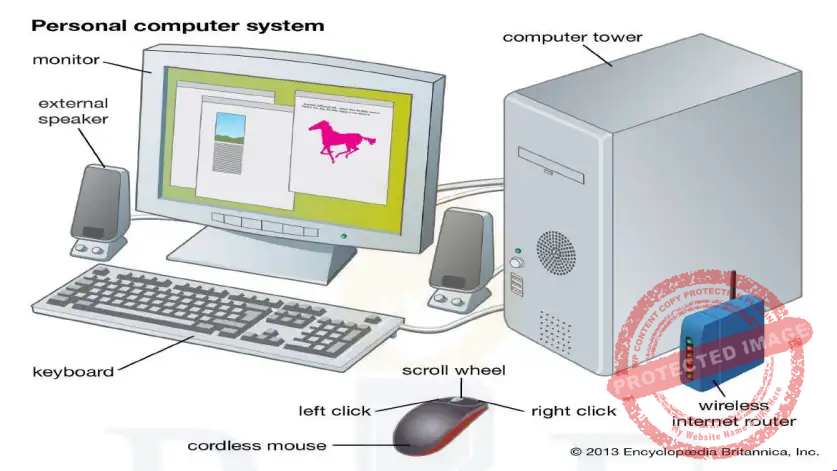
- An electronic device that consists of hardware and software.
- Hardware components describe the physical parts of the
computer. - Software controls hardware and run the operating system,
different programs and applications. - A computer system comprises a CPU, memory, input/output
devices and storage devices.
History
- It started with the birth of abacus, a wooden rack holding
two horizontal wires with beads strung on them. - In 1642, first digital(mechanical) computer was developed
by Blaise Pascal in 1642 - In 1833, Charles Babbage conceived an automatic calculator
or computer which is why he is called as the Father of computer. - In 1890, Punched cards (Tabulating machine) were used by Herman Hollerith and James Powers. These could read the information that had been punched into the cards automatically without human help.
- Punch cards using computers (Turing machine) was created by IBM (International
Business Machines). These were electromechanical devices. These could add, multiply and
sort. - In 1942, ENIAC (Electrical Numerical Integrator and Calculator), a high speed electronic
computer was developed by John P. Eckert, John W. Mauchly and their associated at
Moore school of Electrical Engineering of University.- It occupied entire 30 by 30 feet room.
- Was about 1000 times faster than previous computers and used 18,000 vacuum
tubes.
- In 1950, magnetic core memory and transistor circuit element of digital computers were
used. - In 1980s, manufacturing of semi-conductor chips was done.
Facts:
- First computer programme was developed by Lady Ada Augusta, a student of Babbage.
- December 2 is observed as Computer Literacy Day.
- First computer made in India was Siddharth, which was manufactured by Electronics
Corporation of India. - First computer in India was installed in the Main Post Office in Bengaluru.
- First super computer of the world is CDC 6600 released in 1964.
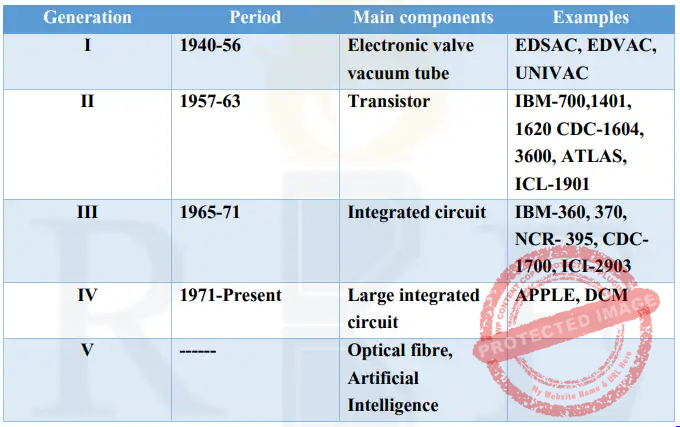
Generations of Computer
Types of Computer
On the basis of data handling capabilities, there are three types of computers:
- Analog computer
- Digital computer
- Hybrid computer
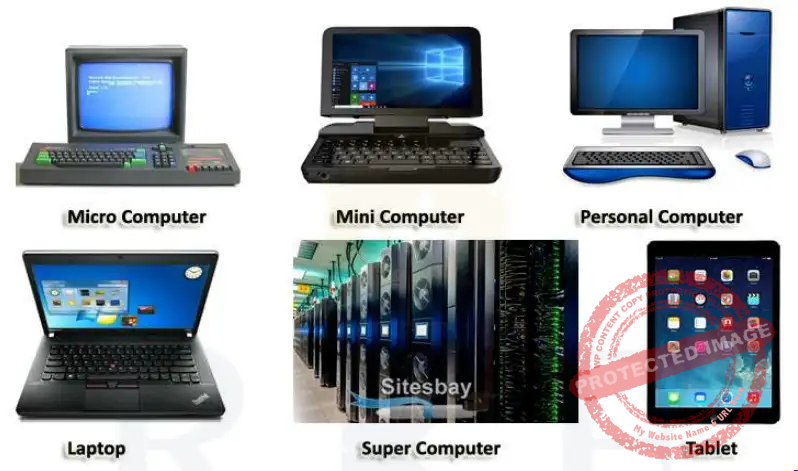
On the basis of computing power and speed there are following types of computer:
- Personal computer
- Workstation
- Minicomputer
- Main frame
- Super computer
Analog Computer
- These involve data that continually changes and does not have discrete values. Eg: Mercury
thermometer, Speedometer
Digital Computer
- These accept the raw data as input, done in binary numbers (0 and 1). Eg: Laptop, Desktops,
Smart phones etc.
Hybrid Computers
- These have features of both digital and analog computers. These can process both discrete and
continuous data. - Eg: processors used in petrol pumps ( as they calculate both quantity and price).
Personal Computer or Microcomputer
- Based on microprocessor technology enabling manufacturers to put an entire CPU on a single
chip. Eg: Laptop or notebook computer
Workstation
- Computer that is used explicitly for engineering applications like CAD/CAM, software
development, desktop publishing.
Mini Computer
- Comparatively larger than micro computer.
- 5 to 50 times more power than micro computer.
- Mainframe Computer
- More than 100 people can work at a time on different terminals by time sharing and multi
tasking techniques.
Super Computer
- Very powerful, most expensive, fastest computers.
- Able to process most complex jobs with a very high speed.
- The first supercomputer was developed in 1976 by Roger Cray.
Quantum Computer
- Development of this type of computer is in final stage.
- In quantum computers, Q-Bit will be used in lieu of Binary Bits.
Organization of Computer
A computer is organised into three basic units:
- The central processing unit
- The memory unit
- The input/output unit
Also a computer has mainly two main parts:
- Hardware
- Software
Central Processing Unit (CPU)
- Referred to as the brain of the computer.
- Given the instructions and data through programs. The CPU then fetches the program and
data from the memory and performs arithmetic and logic operations as per the given
instructions and stores the result back to the memory. - CPU stores the data as well as instructions in its local memory called registers which are
limited in size and number. - Divided into three main components:
- ALU (Arithmetic and logic unit)
- Control Unit
- Registers
Arithmetic and Logic unit
- ALU performs all the arithmetic and logic operations that need to be done as per the
instruction in a program.
Control unit
- CU controls sequential instruction execution, interprets instructions and guides data flow
through computer’s memory, ALU and input or output devices.
Registers
- Storage locations that hold instructions or data while CPU is using them
Input/Output
- Input enables us to enter data into a computer. Eg: Keyboard and Mouse
- Output enables the computer to show the results. Eg: Printer, Monitor, Speakers etc.
- Input-output devices are also called peripheral devices.
- These are also called interface as they translate information for man and machine
Input Devices
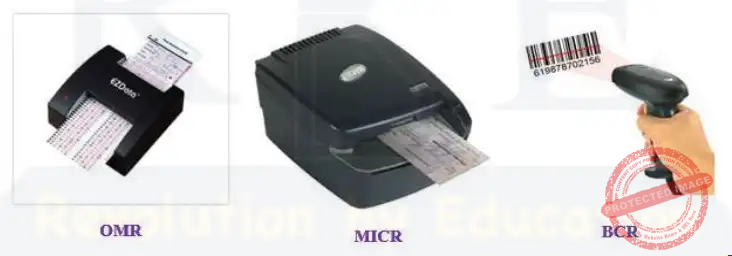
- OMR (Optical Mark Reader) is an input device capable of reading specially prepared forms
- which have a provision for black marks in a specific positions.
- MICR (Magnetic Ink character reader) is an input device used by the banks.
- BCR (Bar code reader) is able to scan and decode barcodes.
- QR (Quick response) contains a matrix of code.
Keyboards
- Alphabetical keys (A-Z, a-z), Number keys (0-9), Function keys (F1 to F12), modifier keys
(Ctrl, Alt, Shift), Toggle keys (Caps lock, Num-lock, Scroll lock) etc. - There are 104 keys in standard keyboards, and 17 keys in number pad.
Mouses
- There are two types of mouses: Optical mouse and mechanical mouse
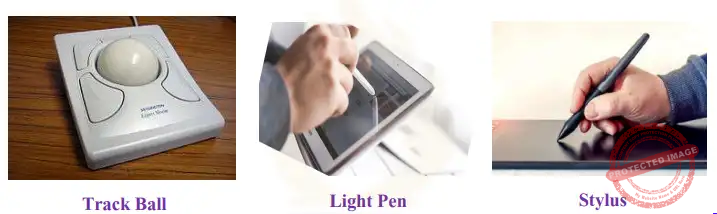
Track ball
- Pointing device that can be used instead of mouse
Light pen
- Used for digital signature. It can work with any CRT based monitor
Stylus
- Pen shaped input device that is used to draw or write on the screen of a graphic tablet.
Scanner
Input device that reads an image and converts it into a digital file. There are different types of
scanners:
- Flat bed scanner (uses a flat surface to scan documents).
- Sheet fed scanner (paper is fed into the scanner).
- Handheld scanner (scanner is dragged over the page to be scanned).
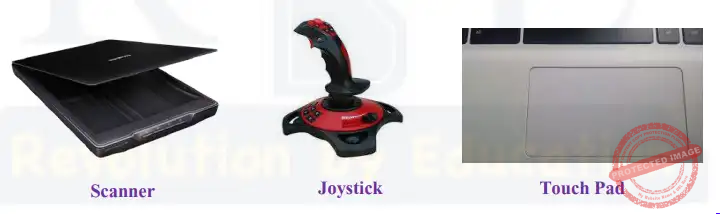
Joystick
- Input device used to control video games.
Touch Pad
- It consists a specialized surface that can translate the motion and position of a user’s fingers to
a relative position on the operating system.
Microphone
- Converts sound waves into electric waves or input the audio into the computers.
Pen tab
- Enables the user to hand draw images, animations and graphics with a special pen like stylus.
Output Devices
Monitor
- Known as standard output device.
- It is of the following types:
- CRT (cathode ray tube)
- TFT (thin film transistor)
- LCD (Liquid crystal display)
- LED (Light emitting diode)
- On the basis of colours, monitors can be divided into monochrome monitors and colour
monitors.
Printers
Impact printers
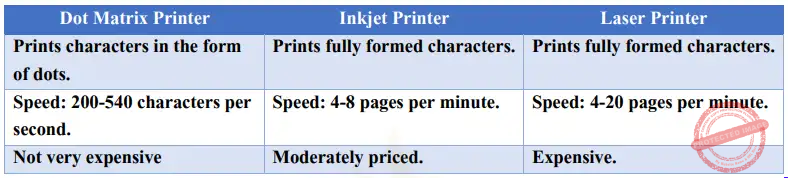
- Use hammer and ribbon on the paper directly.
- Ex: Daisy wheel, Dot matrix, Line printers
- This mechanism is known as electromechanical
mechanism.
They are of two types:
- Character printers
- prints only one character at a time
- relatively slower speed.
- Eg: Dot Matrix printers
- Line printers
- Prints one entire line of text at a time.
Non-impact printers
- Does not use hammer and ribbon for printing.
- Also does not strike the paper directly.
- Eg: Inkjet, Laser, thermal printers etc.
Printers generally come in three popular versions:
- Dot matrix printers
- Ink-jet printers
- Laser printers
Plotters
- Used to produce high quality, accurate and bigger drawings.
- Used in CAD, CAM applications such as house maps, banners, hoardings, car parts etc.
Computer Memory
- It is used to store data and instruction. It is three types:
- Cache Memory
- Primary or Main Memory
- Secondary Memory
Cache Memory
- Very high speed semiconductor memory.
- Acts as a buffer between CPU and the main memory.
- Used to hold those parts of data and program which are most frequently used by CPU.
- Much faster than main memory and consumes less access time than main memory.
- Stores data for temporary use.
- Its very expensive.
Primary or Main Memory
- Holds only those data and instructions on which computer is currently working.
- Limited capacity and data is lost when power is switched off.
- Volatile memory.
- Faster than secondary memories.
- Divided into RAM and ROM
RAM
- Random access memory
- Volatile or temporary memory
- Data gets erased when power supply is switched off.
- Faster memory
- CPU can change the contents of RAM at any time.
- It’s a read/write memory.
- Two main types of RAM are:
- Static RAM
- Dynamic Ram
ROM
- Read only memory
- Non-volatile or permanent memory
- ROM chip is used primarily in the start up process of a computer.
- Types of ROM are PROM, EPROM and EEPROM
- PROM = Programmable Read Only Memory
- EPROM = Erasable and Programmable Read Only memory
- EEPROM = Electrically erasable and Programmable Read only memory.
Secondary memory (Auxiliary memory)
- Known as external memory or non-volatile memory.
- These are magnetic and optical memories.
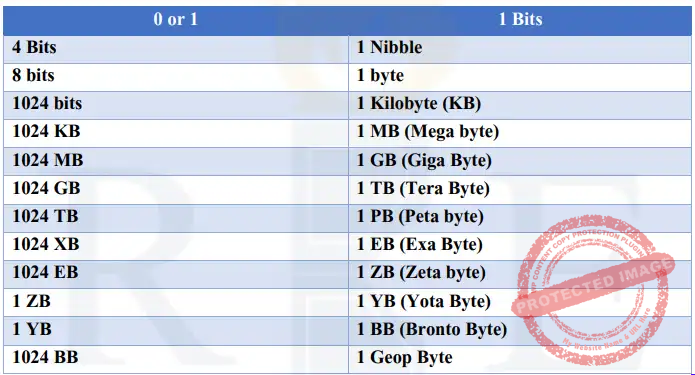
Units of memory
- A computer system uses binary numbers to store and process data.
- The binary digits 0 and 1 are basic units of memory and are called bits.
- Bits group together to form words.
- A4-bit word is called nibble and 8-bit word is called a byte


Further
- BB (Bronto Byte) 1 BB= 1024 YB
- 1 Geop Byte= 1024 Bronto Byte
Microprocessors
- CPU now a days can be implemented on a single microchip which is called microprocessor.
- These carry out various tasks involved in data processing as well as arithmetic and logical
processing.
Computer Language
- To perform a particular task, programmer prepares a sequence of instructions known as
program. - A program written for computer is known as software.
1st Generation language
- Known as machine language.
- Instruction is given in the form of 1s and 0s
2nd Generation language
- Known as assembly language or symbolic programming language.
- Low level programming language for microprocessors (CPU) and other programmable devices.
3rd Generation language
- These are high level languages.
- Eg: FORTRAN, COBOL, BASIC, PASCAL. PL-1 etc.
- Focuses on How the problem gets programmed and how the problem will get solved
4th Generation languages
- Known as Query languages
- Eg: SQL (Structured Query language).
- Focuses on What is required
5th Generation language
- Touches on expert systems, computerized collection of the knowledge, artificial intelligence
Eg: PROLOG, OPS5 and Mercury.
Ports
Connection point acts as an interface between the computer and external devices like printers,
modems etc.
- Internal Port: It connects the system’s motherboard to internal devices like hard disk, CD drive, internal Bluetooth, etc.
- External Port: It connects the system’s motherboard to external devices like a mouse, printer, USB, etc.
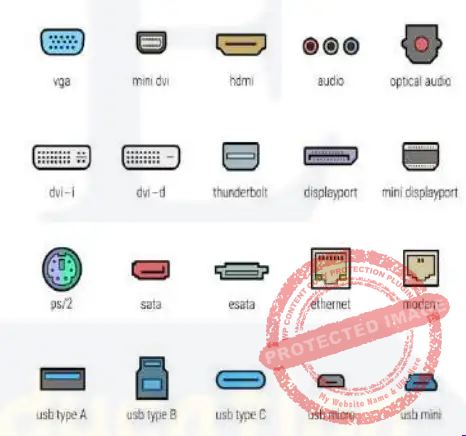
Some important types of ports are as per follows:
Serial Port :
- Used for external modems and older computer mouse
- Two versions-9pin, 25pin
- Data travels at 115 kilobits per second
- Transmits a single stream of data at a time.
Parallel Port :
- Used for scanners and printers
- 25 pin model
- Transmits multiple data streams at a time.
Universal Serial Bus (or USB) Port:
- It can connect all kinds of external USB devices such as external hard disks, printers, scanners,
mouse, keyboards, etc. - Data travels at 12 megabits per second.
Firewire Port:
- Transfers large amounts of data at a very fast speed.
- Connects camcorders and video equipment to the computer.
- Data travels at 400 to 800 megabits per second.
Ethernet Port :
- Connects to a network and high-speed Internet.
- Data travels at 10 megabits to 1000 megabits per second depending upon the network
bandwidth
Windows explorer
- New name = File explorer
- Divided into two parts.
- Left side displays disk drives and folders in hierarchical order.
- Right side displays the contents of the folder
Keyboard Shortcuts
- Ctrl + A Select all
- Ctrl + B: Bold
- Ctrl + C: Copy
- Ctrl + E: Centre Alignment
- Ctrl + I Italics
- Ctrl + J Justified Alignment
- Ctrl + L Left Alignment
- Ctrl + N: New blank document
- Ctrl + O Open existing document
- F12 Save as
- Ctrl + R Right Alignment
- Alt + Tab: Switch to next opened program
- Ctrl + Y Redo
- Ctrl + Z: Undo
- Ctrl + W: Close file
- Ctrl + X: Cut
- Ctrl + V: Paste
- Ctrl + S: Save
- F7: Spell Check
- F2: Edit/Rename
- Ctrl + Home: Go to the beginning of the file
- Ctrl + End: Go to the end of the file
- Alt + Shift+ Tab: Switch to previous opened program
- Alt + F4: Close window/ Shut down
- Ctrl + U: Underline
- Ctrl + P Print
- Ctrl + K: Hyperlink
ENIAC = Electronic Numerical Integrator and Computer
EDVAC = Electronic discrete Variable automatic computer
EDSAC = Electronic Delay storage Automatic computer
UNIVAC = Universal Automatic Computer
History of Computer Notes : Important Links
| Complete Computer Notes (FREE) | Click Here |
| Home Page | Click Here |